CurbWhiz works out the most you can pay for a car — buyer fees, repairs, transport and your profit target counted — so you walk in with a ceiling, not a guess.
Unknown is never $0A missing cost holds the answer back.
Every number has a reasonAssumptions and sources on show.
Saved on your deviceDeals stay there unless you turn on sync.
Private seller, dealer or auctionOne check for all three.
The numbers
The napkin math, done to the cent.
Type what you know. CurbWhiz does the arithmetic — fees, tax, repairs, contingency and margin — and gives you the highest price that still fits your target or your budget.
Worked example · synthetic numbers
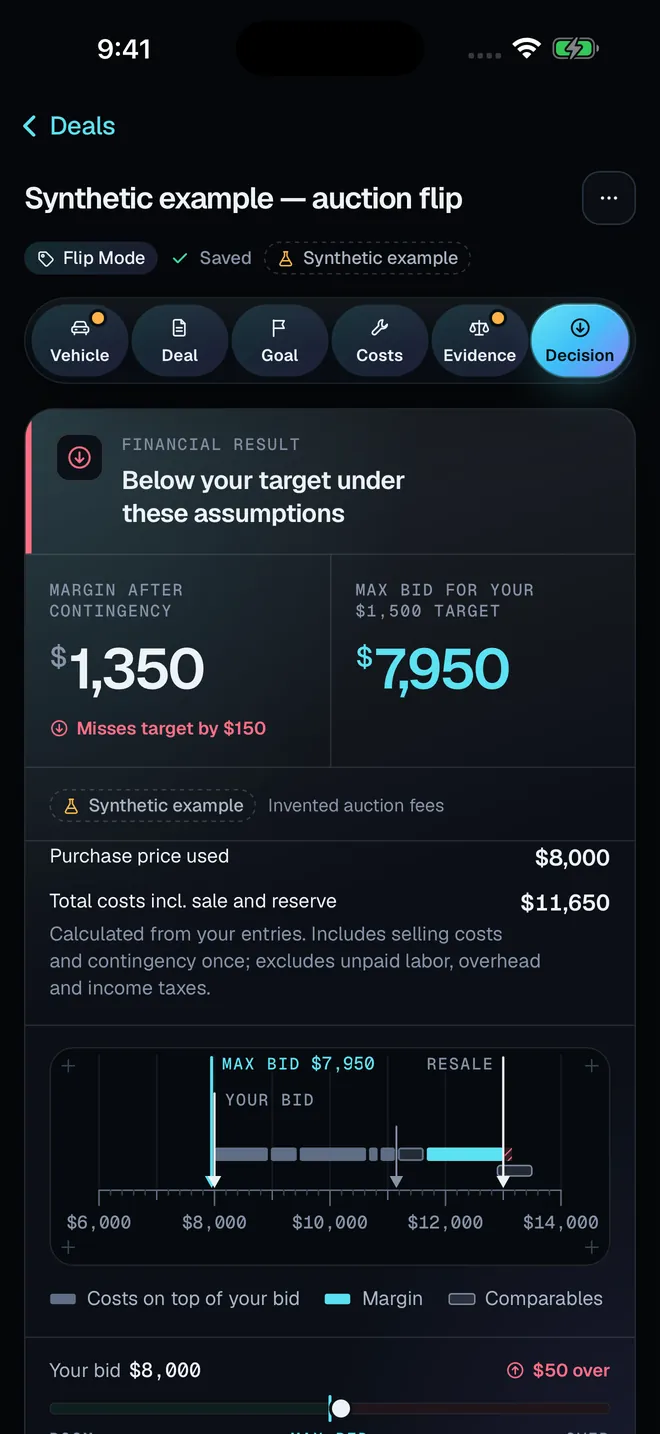
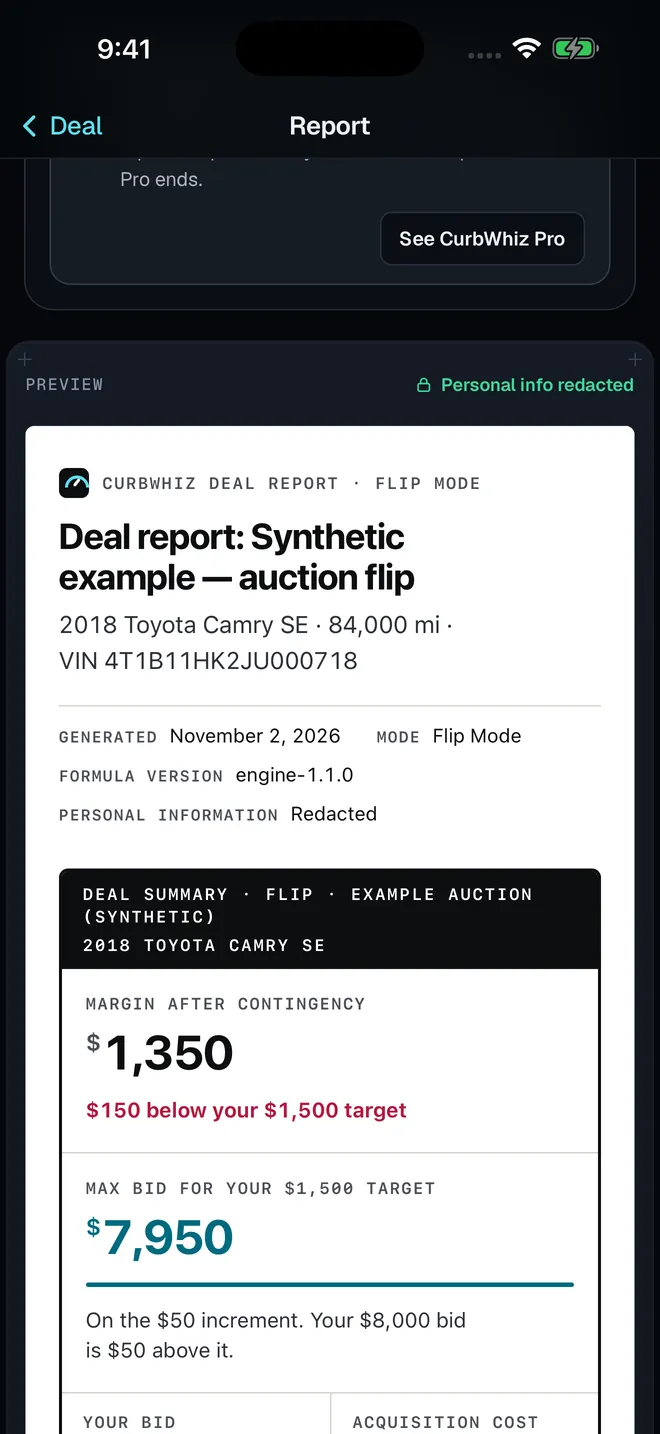
Your max bid, fees included
Buyer-fee brackets, repairs and contingency, solved back to the bid that still leaves your profit target.
Max bid
Your bid
Resale
$6,000$8,000$10,000$12,000$14,000
Max bid
$7,950
Margin
$1,350
Target
$1,500
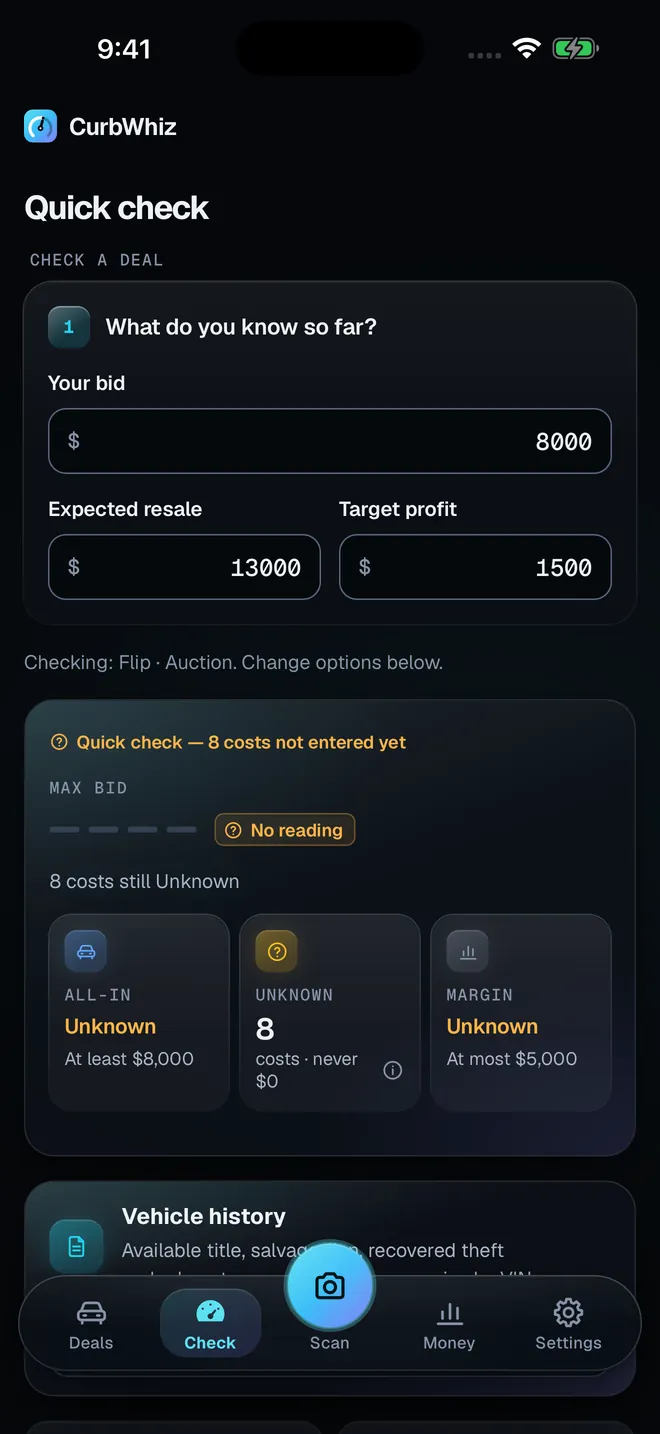
Unknown costs never become $0
CurbWhiz holds back the ceiling until every required cost is answered — entered, estimated, or marked not applicable.
Buyer fee Entered
Transport Unknown
Repairs Unknown
Title & registration Unknown
Max bidNo reading yet
Worked example · synthetic numbers
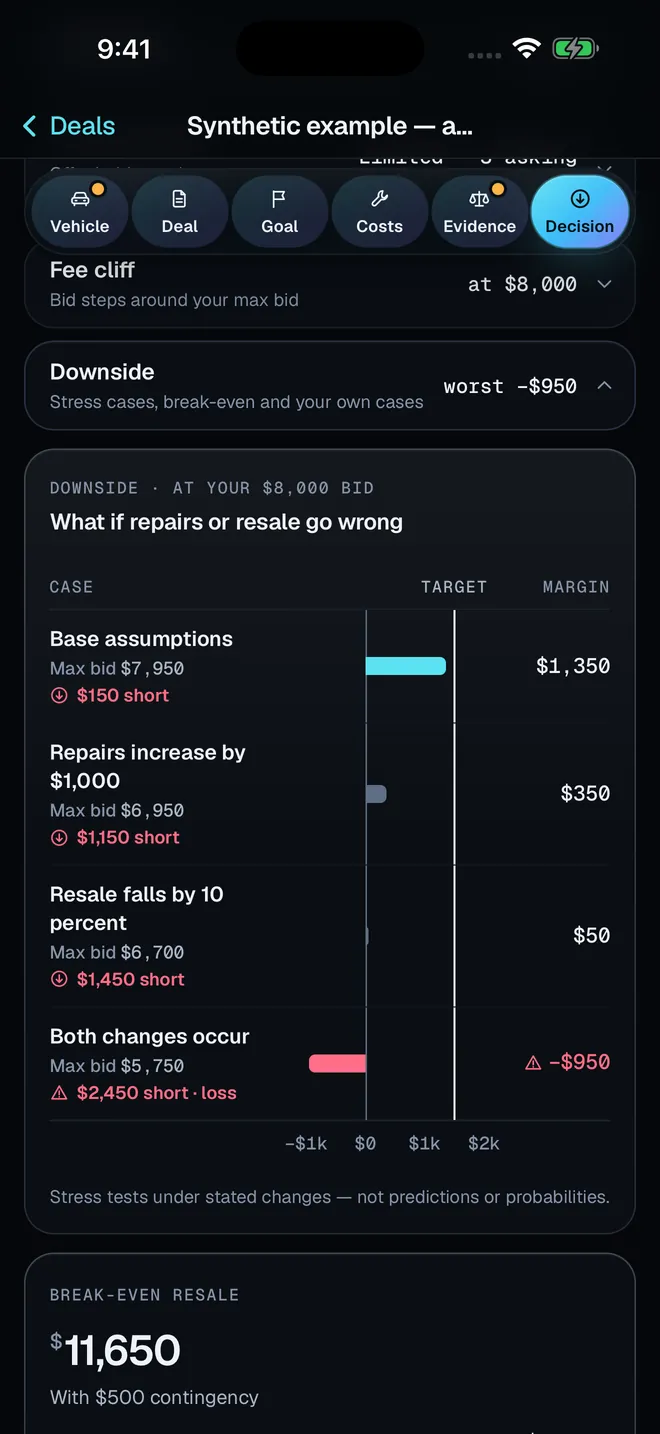
Stress-test it before you bid
See the margin if repairs run higher or the resale comes in lower. Scenarios, not predictions.
Base assumptions $1,350
Repairs up $1,000 $350
Resale down 10% $50
Both happen −$950
Worked example · synthetic numbers
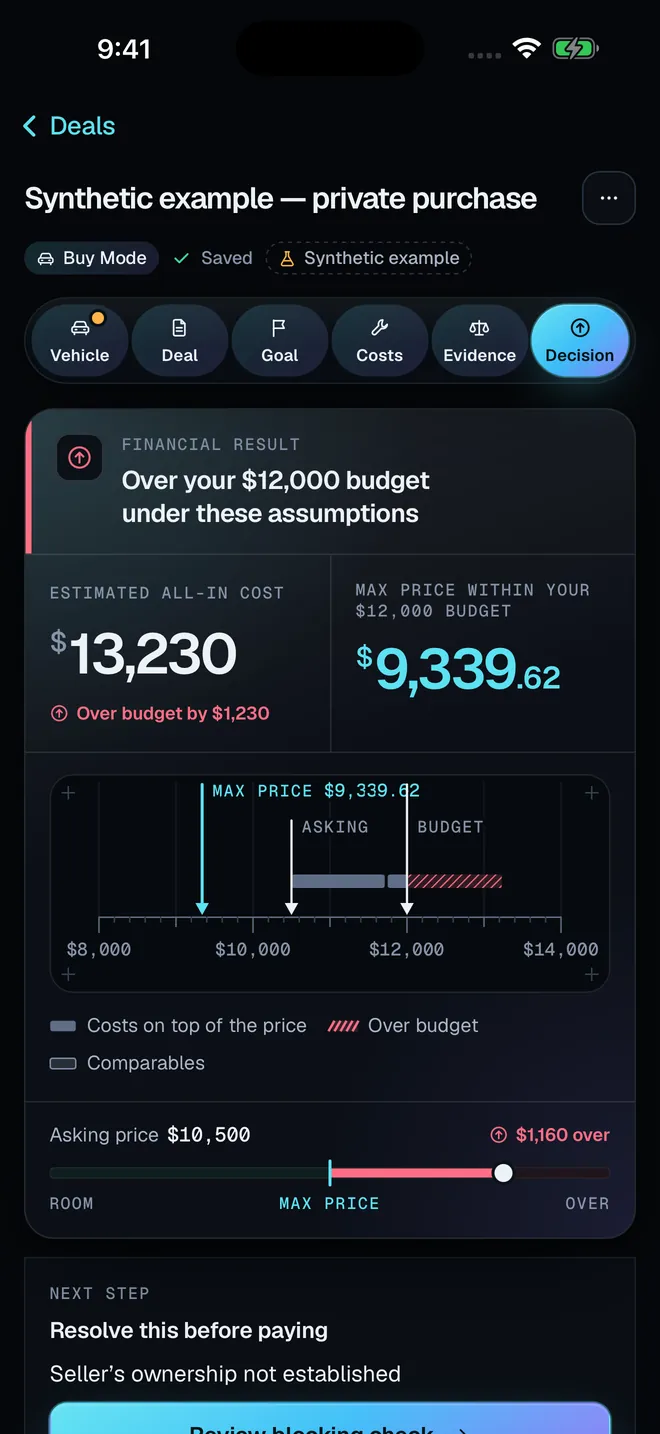
The most you can pay within your budget
Buying to keep? Tax, title, transport, repairs and contingency are counted against your budget. Any loan payment is shown separately.
All-in $13,230Budget $12,000 · $1,230 over
Max price
$9,339.62
Asking
$10,500
Auction fees by bracket
Buyer fees step up with the price. CurbWhiz shows the fee cliff: the bid steps around your max bid.
Illustration · enter the fees from your auction’s own terms
Check the car as well as the math
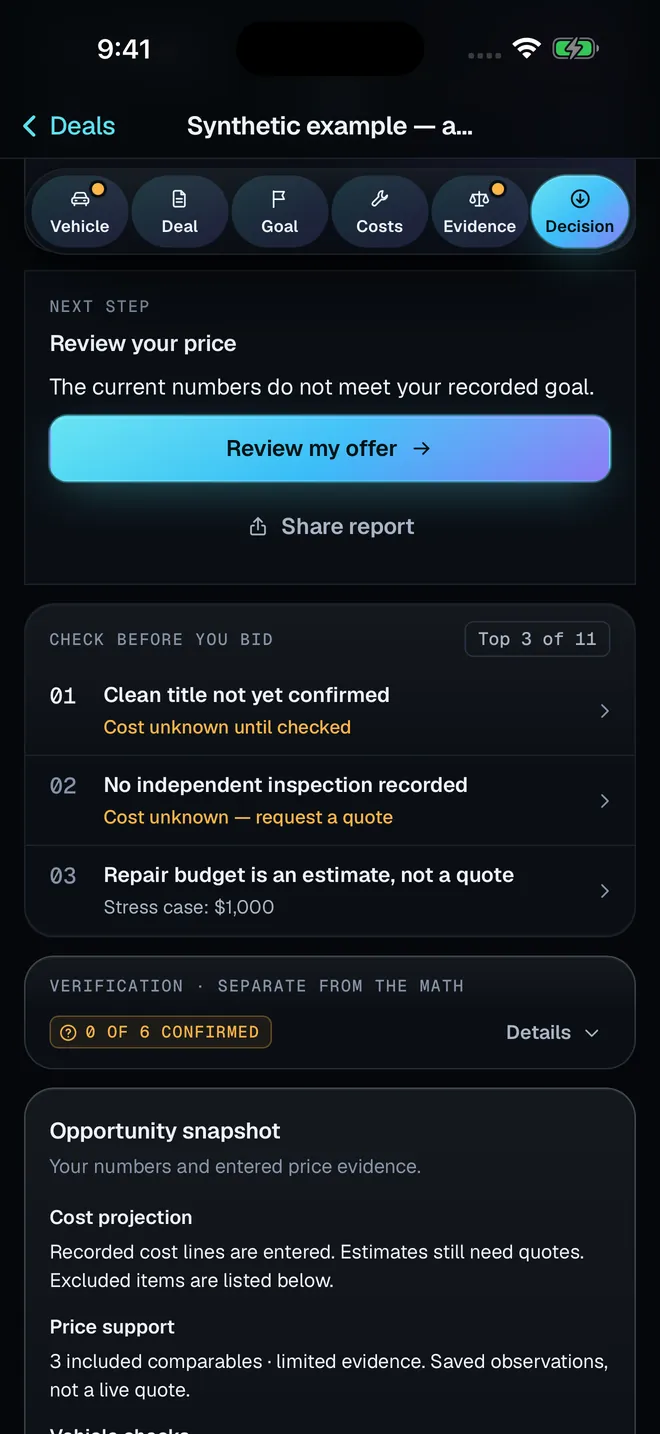
Title, mileage and inspection checks stay separate from a calculated profit — with the questions to ask before you pay.
Clean title confirmed Open
Independent inspection Open
A report you can share
Assumptions, sources and open questions together in one deal report. Free to read; sharing and printing are part of Pro.
Personal details Hidden by default
Formula version Printed on it
How it works
From listing to limit in three steps.
Start with what you have
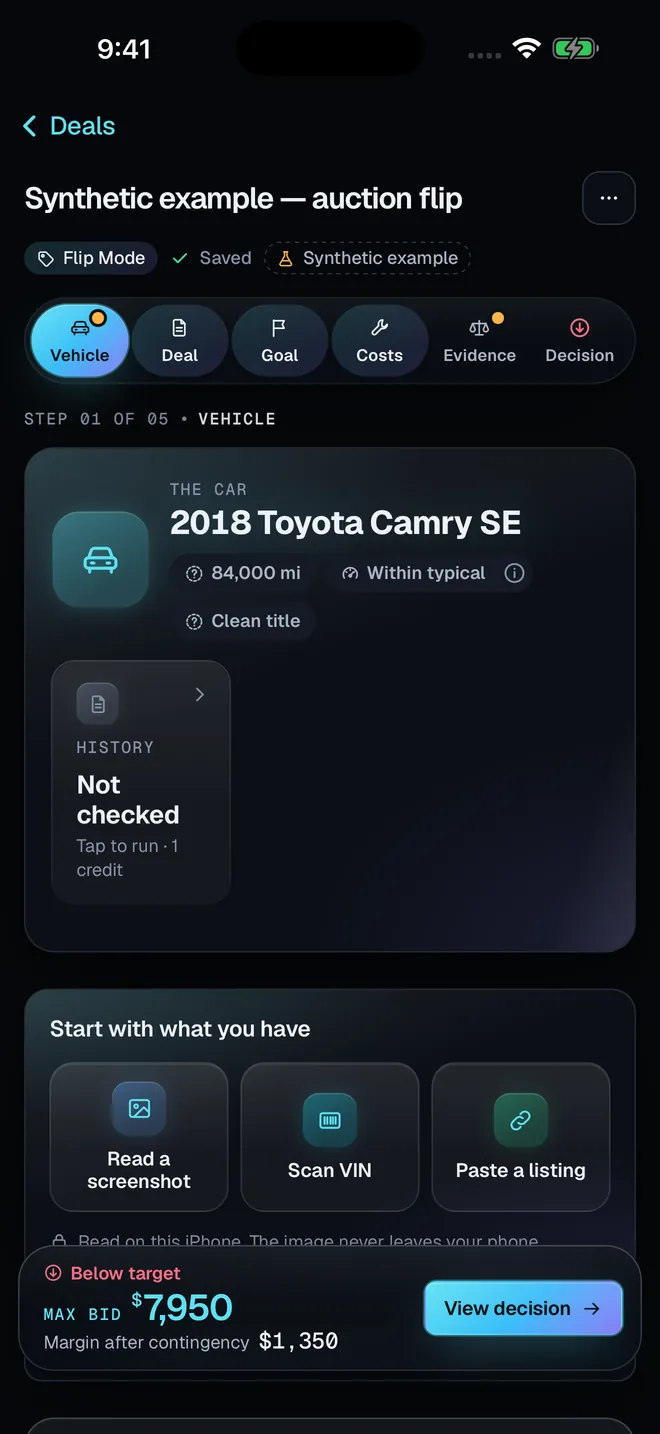
A VIN on the door jamb, a screenshot of the listing, pasted seller text — or just the price.
Scan VINRead a screenshotPaste a listingType it in
Fill in the costs
Start from labelled estimates for supported taxes, registration, fees, transport and inspection. Review the sources and dates, then replace them with your own quotes.
Get your ceiling
Your max bid or max price, the downside cases, and the checks to finish before money changes hands.
On iPhone
An instrument panel for the deal.
Real screens from the iPhone app. VIN camera scan, on-device screenshot reading, widgets, Shortcuts and an auction-day Live Activity are built in.
Unknown costs never become $0See missing costs before you commit.
Check the car as well as the mathEvidence checks stay apart from the profit.
Stress-test the dealHigher repairs, lower resale, or both.
Every number has a reasonOne shareable report per deal.
The most you can payAll-in cost against your budget.
Worked examples · synthetic numbers — not real cars, listings or fees
Before you buy
Research the car, not just the price.
Recalls, complaints and fuel cost
Public records for the model year, in one place.
NHTSA recall campaigns, complaints and crash ratings
EPA fuel-cost research
A link to NHTSA’s lookup for the actual VIN
Model-year records do not establish this VIN’s recall repair status or safety. Check the actual VIN with NHTSA and the manufacturer.
Vehicle history reports
Optional VINData reports, bought one at a time or as a 5-pack — with or without Pro.
Reported title brands, salvage and total-loss records
Odometer readings and open liens
Recovered thefts and other reported events, where available
Active theft records, detailed accident or repair history and auction photos are not provided. Missing records do not mean a clean title or a safe car. Reports need sign-in and your approval to send the VIN to VINData. Every report includes the NMVTIS disclaimer and is no substitute for an inspection.
Straight talk
What CurbWhiz won’t do.
It is a calculator and a checklist. The judgment — and the inspection — stay with you.
No market values, no listing discovery. The numbers come from what you enter.
No promise of profit. Results depend on reviewed inputs and available evidence.
No verdict on the car. “Meets your target” is about the money, not a recommendation to buy.
Not financial, legal or tax advice. Check tax, title and fee rules with your state and the seller or auction.
Pricing · iPhone app
Checking is free. Pro keeps the book.
Free, always
$0
The Check tab — local deal math, no account
Both worked examples
Learn
Exporting or erasing your data
Backing up, restoring and deleting are always free.
CurbWhiz Pro
$99.99per year
or $19.99 per month
Saved deals and Compare
The shareable PDF report and snapshot history
Your own fee tables and deadline reminders
The Money tab: purchases, expenses and sales
Annual includes 1 vehicle history report per calendar month
U.S. reference prices. Annual may offer an eligible 3-day trial; monthly has no free trial. Confirm prices, billing periods and trial terms in Apple’s purchase sheet. Subscriptions renew automatically unless cancelled at least 24 hours before the period ends. Included reports unlock after confirmed payment, not during a trial, and do not roll over. Monthly Pro does not include history reports. Losing Pro never deletes saved deals.
Questions
Asked before the auction.
The short answers. The support guide has the rest.
No account is needed for local checks or worked examples. Sign-in is needed for vehicle history reports and account features. Signing in alone does not upload or synchronize deals.
Where do the numbers come from?
From what you enter. CurbWhiz does the arithmetic: fees, tax, repairs, contingency, margin and the highest price that fits. It doesn’t look up market values or find listings. For a real auction, enter the buyer fees from its own terms.
Why does a cost say “Unknown” instead of $0?
Because you haven’t entered it yet, and CurbWhiz never treats a missing cost as free. Fill in the line it names, or mark it “Not applicable” if it really doesn’t apply.
Is the result a recommendation to buy?
No. “Meets your target under these assumptions” is about the money, given the numbers you entered. It isn’t a judgment about the car. The checks section lists what to confirm — title, VIN, inspection, mileage and prices — before you buy.
Does it work offline?
Local deal calculations and saved content on your device work offline. Sign-in, subscription changes, fresh VIN decoding, new history reports, cloud AI and device sync need a connection.
Where are my deals stored?
On your device. If you explicitly enable device sync, selected deals can also be stored in your private CurbWhiz account. Signing in alone does not upload them.
Walk in with a number.
Run your next car through CurbWhiz before you raise a hand or shake one.